
Thousands of Postgres clients. A few server connections.

pgmux is a connection pooler for Postgres 14 to 17. It speaks the wire protocol, so your apps and drivers need no changes.

docker run -p 6432:6432 -p 9930:9930 \
  -v "$PWD/pgmux.yaml:/etc/pgmux/pgmux.yaml" \
  ghcr.io/sanjeepan23/pgmux:latest
2,000 clients 25 server connections

What pgmux does

Transaction pooling, with prepared statements

A client holds a server connection only while its transaction runs. When the transaction ends, the next client gets that connection.

  • Prepared statements work. pgmux prepares each statement again on the server that the client lands on. Clients need no flags.
  • Client settings stay with their client. A SET TimeZone from one client never reaches a different client.
  • Session mode is there too. Choose the mode for each database.
pgmux.yaml
pool_mode: transaction

pool:
  default_size: 20
  query_wait_timeout: 30s

databases:
  appdb:
    pool_size: 50
  reports:
    dbname: appdb
    pool_mode: session
    pool_size: 5
Authentication and TLS

pgmux logs clients in itself, and then connects to Postgres for them.

  • SCRAM-SHA-256 and MD5. Use a PgBouncer-style userlist file.
  • No passwords on disk. With auth_query, pgmux gets the password hash from Postgres.
  • TLS on both sides. Accept TLS from clients, and connect to Postgres with verify-full.
pgmux.yaml
server:
  host: db.internal
  sslmode: verify-full

client_tls:
  cert_file: server.crt
  key_file: server.key

auth:
  method: scram-sha-256
  auth_user: pgmux
  auth_query: SELECT usename, passwd
    FROM pg_shadow WHERE usename = $1

See the pools while they work

Watch clients, server connections and wait times live during a load test.

  • Prometheus metrics for clients, servers, wait times and errors. A Grafana dashboard is included.
  • A live dashboard served by the admin API.
  • An admin API to pause, resume and reload pools.
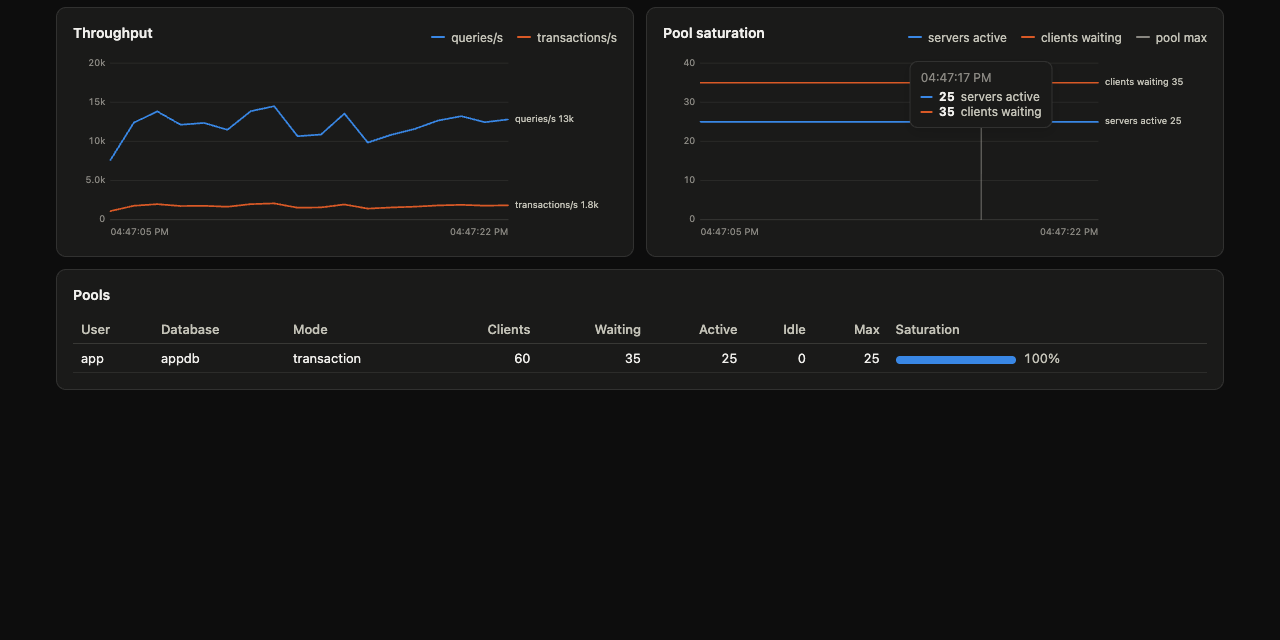
The pgmux dashboard. It shows active, idle and waiting clients, and server connections per pool.

Change the config without a restart

pgmux reloads the config file and the userlist when they change. Pool sizes, timeouts, users and certificates update in place.

  • Pause a pool for a database restart. New queries wait until you resume, up to query_wait_timeout.
  • Graceful shutdown. On SIGTERM, open transactions get time to finish.
shell
# Stop handing out server connections
curl -X POST "localhost:9930/pause?db=appdb"

# Restart Postgres, then continue
curl -X POST "localhost:9930/resume?db=appdb"

# Load the config again
curl -X POST localhost:9930/reload

Tested with real drivers

CI runs the same nine scenarios in four languages, in both pool modes, against Postgres 14 and 17. The scenarios include COPY, cancel, LISTEN and 1M-row results.

LanguageDrivers and ORMsTransaction modeSession mode
Gopgx v5, pgx with database/sql, lib/pqPassPass
Pythonpsycopg 3, asyncpg, SQLAlchemy 2PassPass
TypeScriptnode-postgres, postgres.js, PrismaPassPass
Javapgjdbc, HikariCPPassPass

Benchmarks

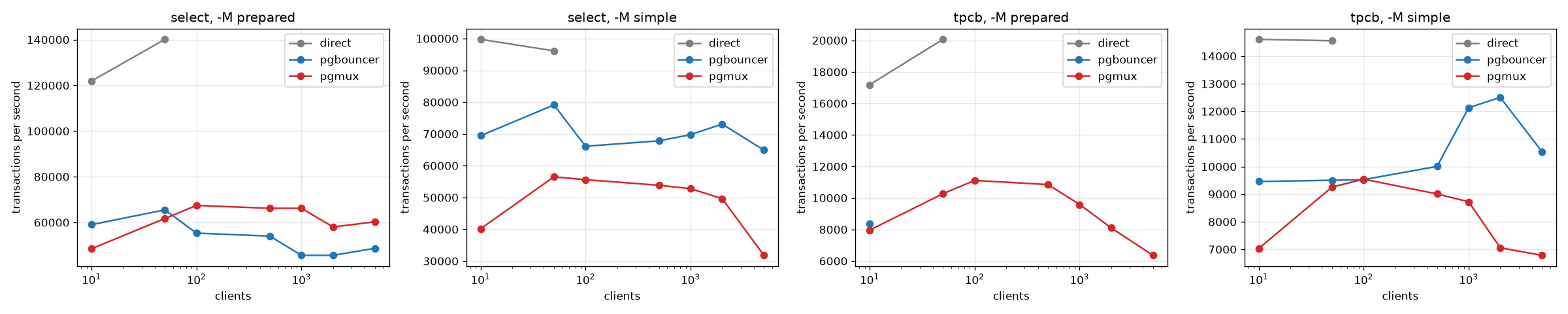
pgbench against PgBouncer 1.24, both in transaction mode with 25 server connections. With prepared statements and 100 or more clients, pgmux is 20% to 45% faster. With the simple protocol, PgBouncer is faster.

Four charts of transactions per second against client count, for direct Postgres, PgBouncer and pgmux.
Transactions per second, median of 3 runs of 60 s. Direct Postgres fails from 100 clients on. Full results and method

Try pgmux in two minutes

Start Postgres and pgmux with Docker Compose, then connect with psql on port 6432.

Read the quick start